Google Ads Enhanced Conversions: The Complete Setup Guide [2026]
Learn how Google Ads Enhanced Conversions work, why they matter for signal accuracy, and how to implement them with server-side tracking for better match rates.
![Featured image for Google Ads Enhanced Conversions: The Complete Setup Guide [2026]](/blog/google-ads-enhanced-conversions-guide/hero.png)
Google Ads Enhanced Conversions are a first-party data feature that sends hashed customer information — email, phone number, name, address — alongside your conversion tags so Google can match ad clicks to conversions more accurately. Instead of relying solely on cookies and click IDs that degrade under browser restrictions, Enhanced Conversions give Google additional match keys to close the attribution loop. When implemented server-side through a first-party signal infrastructure, match rates consistently reach 90%+ compared to sub-50% on legacy pixel-only setups.
If your Google Ads account is reporting fewer conversions than your backend actually records, or if your Smart Bidding campaigns feel like they’re optimizing against incomplete data — Enhanced Conversions are how you fix it.
Table of Contents
- What Are Enhanced Conversions (and Why They Exist)
- How Enhanced Conversions Work
- Three Implementation Levels
- Server-Side Implementation with a First-Party Gateway
- Match Key Quality: What Actually Matters
- Testing and Validation
- Enhanced Conversions vs Meta CAPI: A Quick Comparison
- Common Pitfalls and How to Avoid Them
- FAQ
What Are Enhanced Conversions (and Why They Exist)
Google Ads conversion tracking was built in an era when third-party cookies were reliable and browser-side JavaScript ran without interference. That era is over.
Today, the standard conversion pixel faces multiple points of failure:
- Ad blockers prevent
gtag.jsfrom loading on 30–40% of desktop sessions - ITP and cookie restrictions in Safari and Firefox cap cookie lifetime to 7 days (or less), breaking the
gclid→ conversion link - Network interruptions on mobile cause fire-and-forget pixels to silently drop
- Consent banners delay or prevent tag execution entirely
The result: Google Ads sees fewer conversions than actually occurred. Smart Bidding models train on incomplete data. Your CPA looks inflated, your ROAS looks deflated, and the algorithm under-bids on audiences that are actually converting.
Enhanced Conversions address this by sending hashed first-party data alongside the conversion event. When a user completes a purchase on your site, you collect their email, phone number, or address — data they’ve provided directly to your business — hash it with SHA-256, and send it to Google. Google matches these hashed identifiers against their logged-in user graph to confirm: yes, this user clicked that ad.
This isn’t a workaround. It’s how Google designed conversion tracking to work going forward. The legacy pixel-only path is the fallback, not the primary mechanism.
What Enhanced Conversions are not
- Not a new tag — they augment your existing conversion tags
- Not a privacy bypass — data is hashed before leaving your infrastructure (when done correctly)
- Not offline conversion import — that’s a separate feature for CRM and call data, though they share the same match key model
- Not optional if you want accurate Smart Bidding — Google’s own documentation calls Enhanced Conversions a prerequisite for reliable automated bidding at scale
How Enhanced Conversions Work
The core mechanic is simple: instead of sending Google a conversion event with only a gclid cookie value, you also send hashed customer identifiers. Google uses those identifiers to match the conversion to an ad click through their user graph, even if the original cookie is gone.
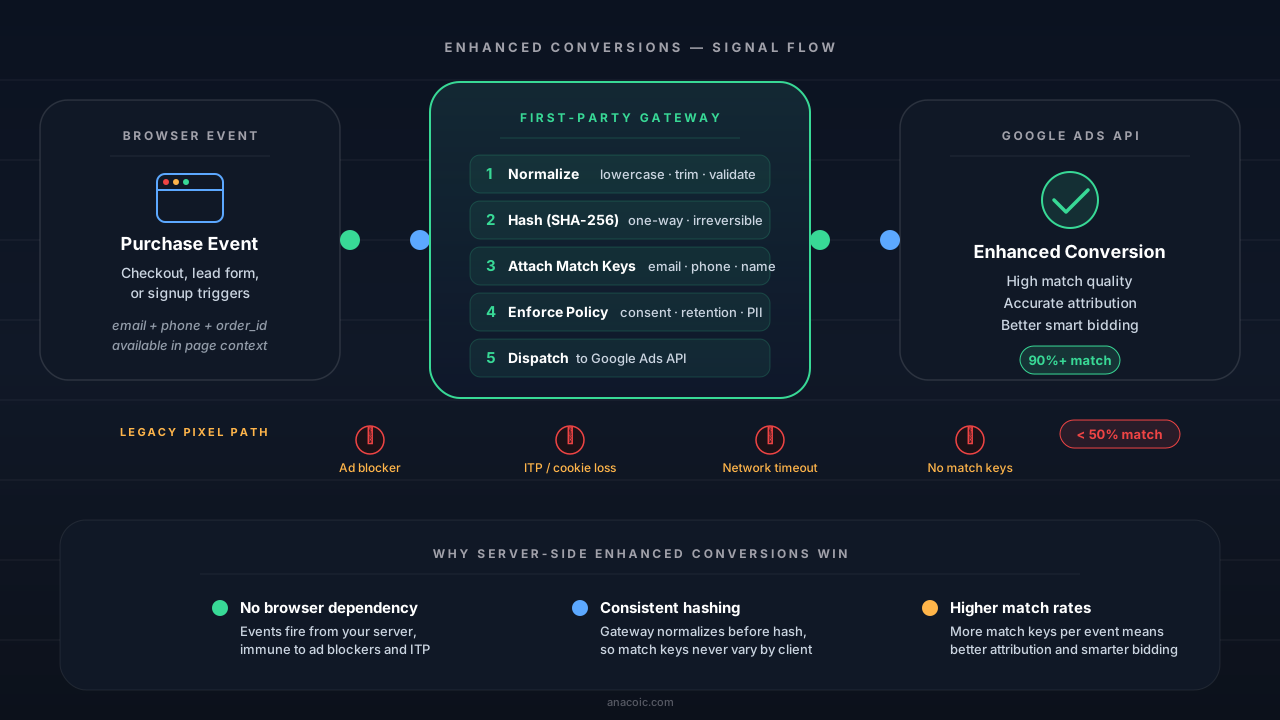
Enhanced Conversions strengthen match quality by sending hashed first-party data alongside the conversion event. A server-side path removes the browser as a single point of failure.
Standard Tracking vs Enhanced vs Full Server-Side
| Capability | Standard Pixel | Enhanced (Browser) | Enhanced (Server-Side) |
|---|---|---|---|
| Relies on cookies | ✅ Yes | ✅ Yes + match keys | ❌ No |
| Survives ad blockers | ❌ No | ❌ No | ✅ Yes |
| Survives ITP | ❌ No | Partially | ✅ Yes |
| Match keys sent | gclid only | gclid + hashed email/phone | gclid + all available match keys |
| Hashing location | N/A | Browser (JavaScript) | Server (your infrastructure) |
| Typical match rate | 30–50% | 60–75% | 85–95% |
| Smart Bidding accuracy | Poor | Improved | Optimal |
| Implementation effort | Low | Medium | Higher (but automatable) |
The jump from standard to browser-side Enhanced Conversions is meaningful. The jump from browser-side to server-side is where it becomes transformational — because you remove the browser as a single point of failure.
The Match Key Model
Google accepts these match keys for Enhanced Conversions, listed in order of match quality impact:
| Match Key | Field Name | Format | Impact |
|---|---|---|---|
email | Lowercase, trimmed, SHA-256 hashed | ✅ Highest | |
| Phone | phone_number | E.164 format, SHA-256 hashed | ✅ High |
| First name | first_name | Lowercase, trimmed, SHA-256 hashed | Medium |
| Last name | last_name | Lowercase, trimmed, SHA-256 hashed | Medium |
| Street address | street | Lowercase, trimmed, SHA-256 hashed | Lower |
| City | city | Lowercase, trimmed, SHA-256 hashed | Lower |
| Region/State | region | Lowercase, trimmed, SHA-256 hashed | Lower |
| Postal code | postal_code | Trimmed (not hashed for some regions) | Lower |
| Country | country | ISO 3166-1 alpha-2 | Lower |
Email alone gets you 70–80% of the benefit. Adding phone number pushes you to 85%+. Name and address fields provide incremental improvement and are most useful when email is unavailable.
Three Implementation Levels
There are three ways to implement Enhanced Conversions, each with different tradeoffs in effort, reliability, and match quality.
Level 1: Browser-Side Enhanced Conversions (gtag)
The simplest approach. You modify your existing gtag.js conversion tag to include user-provided data alongside the conversion event.
gtag('set', 'user_data', {
  email: '[email protected]',       // will be auto-hashed by gtag
  phone_number: '+11234567890',
  address: {
    first_name: 'Alex',
    last_name: 'Johnson',
    street: '123 Main St',
    city: 'Portland',
    region: 'OR',
    postal_code: '97201',
    country: 'US',
  },
});

gtag('event', 'conversion', {
  send_to: 'AW-XXXXXXXX/CONVERSION_LABEL',
  value: 149.99,
  currency: 'USD',
  transaction_id: 'order_abc123',
});
Pros: Minimal implementation effort. Google’s gtag.js handles hashing automatically.
Cons: Still runs in the browser. Ad blockers prevent loading. ITP can still break the gclid cookie. You’re trusting client-side JavaScript to handle PII correctly. No visibility into whether the event actually reached Google.
Verdict: Better than nothing, but you’re still exposed to every browser-side failure mode.
Level 2: Enhanced Conversions for Web via GTM
Google Tag Manager adds a layer of configuration management. You set up a conversion tag with user-provided data variables that GTM resolves from your data layer.
// Push user data to the GTM data layer before the conversion fires
window.dataLayer = window.dataLayer || [];
dataLayer.push({
  event: 'purchase',
  transaction_id: 'order_abc123',
  value: 149.99,
  currency: 'USD',
  user_data: {
    email_address: '[email protected]',
    phone_number: '+11234567890',
    address: {
      first_name: 'Alex',
      last_name: 'Johnson',
    },
  },
});
In GTM, you configure the Google Ads Conversion tag to read user_data from the data layer and enable “Include user-provided data from your website” in the tag settings.
Pros: Easier to manage across multiple conversion actions. GTM’s server-side container option gives you a migration path.
Cons: Same browser-side vulnerabilities as Level 1. GTM adds latency. Server-side GTM (sGTM) improves things but introduces its own infrastructure complexity.
Verdict: Good middle ground for teams already using GTM. Server-side GTM is a meaningful improvement, though it still requires managing another infrastructure layer.
Level 3: Server-Side Enhanced Conversions (Conversions API)
The most reliable approach. Your server sends conversion data directly to the Google Ads API with hashed customer information, completely bypassing the browser for the conversion delivery.
This is what Google calls “Enhanced Conversions for Leads” when used for lead-gen, and it’s the same mechanism behind offline conversion imports. The key difference: you’re firing it in real-time (or near-real-time) from your own server infrastructure.
// Server-side conversion upload via Google Ads API
const conversionAdjustment = {
  adjustment_type: 'ENHANCEMENT',
  conversion_action: 'customers/1234567890/conversionActions/987654321',
  order_id: 'order_abc123',
  adjustment_date_time: '2026-03-21 14:30:00-07:00',
  user_identifiers: [
    {
      hashed_email: sha256(normalize('[email protected]')),
    },
    {
      hashed_phone_number: sha256(normalizePhone('+1 (123) 456-7890')),
    },
    {
      address_info: {
        hashed_first_name: sha256(normalize('Alex')),
        hashed_last_name: sha256(normalize('Johnson')),
        country_code: 'US',
        postal_code: '97201',
      },
    },
  ],
  user_agent: originalUserAgent,
};
Pros: Immune to ad blockers, ITP, and network drops. You control hashing and normalization. Full observability into delivery success. Highest possible match rate.
Cons: Requires API integration, OAuth setup, and infrastructure to manage the conversion pipeline. Without automation, this is significant engineering work.
Verdict: This is the target state. Everything else is a stepping stone.
Server-Side Implementation with a First-Party Gateway
The engineering cost of Level 3 is real — OAuth token management, API versioning, retry logic, rate limiting, hash normalization. This is exactly the problem a first-party signal infrastructure solves.
A gateway sits between your application and Google’s API. Your application fires a single, standardized event. The gateway handles normalization, hashing, policy enforcement, and delivery to Google (and any other destination — Meta CAPI, TikTok Events API, etc.).
Event Payload Example
Here’s what a server-side event looks like when routed through a first-party gateway:
// Your application fires a single event to your gateway
const event = {
  event_name: 'purchase',
  event_id: 'evt_2026032114300001',       // idempotency key
  timestamp: '2026-03-21T14:30:00.000Z',

  // Transaction data
  transaction_id: 'order_abc123',
  value: 149.99,
  currency: 'USD',

  // User-provided data (PII — gateway will normalize + hash)
  user_data: {
    email: '[email protected] ',          // not yet normalized
    phone: '+1 (123) 456-7890',          // not yet in E.164
    first_name: ' Alex ',
    last_name: 'Johnson',
    address: {
      street: '123 Main St',
      city: 'Portland',
      state: 'OR',
      postal_code: '97201',
      country: 'US',
    },
  },

  // Browser context (captured at event time)
  context: {
    user_agent: 'Mozilla/5.0 ...',
    ip_address: '203.0.113.42',
    page_url: 'https://shop.example.com/thank-you',
    gclid: 'Cj0KCQjw...',              // if available from cookie
  },
};

// POST to your first-party endpoint
await fetch('https://signals.yourdomain.com/track', {
  method: 'POST',
  headers: {
    'Content-Type': 'application/json',
    'X-Gateway-ID': 'gw_your_gateway_id',
  },
  body: JSON.stringify(event),
});
What the Gateway Does
When this event arrives at the gateway, here’s the processing chain:
- Validate — Check required fields, verify the gateway ID, confirm consent status
- Normalize — Lowercase emails, trim whitespace, convert phone to E.164 format, standardize address fields
- Hash — SHA-256 hash all PII fields after normalization (email, phone, name, address)
- Enrich — Attach any additional match keys from your customer record if available
- Enforce policy — Apply retention rules, check consent flags, strip fields that fail policy
- Dispatch — Send to Google Ads API (and any other configured destinations) with proper authentication, retry logic, and delivery confirmation
// Inside the gateway: normalization + hashing pipeline
function normalizeAndHash(userData: UserData): HashedUserData {
  const normalize = (str: string) =>
    str.trim().toLowerCase().replace(/\s+/g, ' ');

  const hash = (value: string) =>
    crypto.createHash('sha256').update(normalize(value)).digest('hex');

  return {
    hashed_email: userData.email ? hash(userData.email) : undefined,
    hashed_phone: userData.phone
      ? hash(normalizePhone(userData.phone))
      : undefined,
    hashed_first_name: userData.first_name
      ? hash(userData.first_name)
      : undefined,
    hashed_last_name: userData.last_name
      ? hash(userData.last_name)
      : undefined,
    address: userData.address
      ? {
          hashed_street: hash(userData.address.street),
          city: normalize(userData.address.city),
          region: normalize(userData.address.state),
          postal_code: userData.address.postal_code.trim(),
          country: userData.address.country.toUpperCase(),
        }
      : undefined,
  };
}

function normalizePhone(phone: string): string {
  // Strip everything except digits and leading +
  const digits = phone.replace(/[^\d+]/g, '');
  // Ensure E.164 format
  return digits.startsWith('+') ? digits : `+${digits}`;
}
The critical advantage: your application never needs to know about Google’s hashing requirements, API versioning, or authentication flow. You fire a standard event once. The gateway handles everything downstream. When Google changes their API (and they will), you update the gateway — not every application touchpoint.
This is the same architecture pattern used for server-side tracking across all platforms. One event in, many destinations out.
Match Key Quality: What Actually Matters
Not all match keys contribute equally. Here’s what the data shows:
Impact Ranking
| Priority | Match Key | Typical Lift | Notes |
|---|---|---|---|
| 1 | Email (hashed) | +30–40% match rate | Single highest-impact field. Most users are logged into Google with an email. |
| 2 | Phone (hashed) | +10–15% additional | Strong secondary signal. E.164 format is critical. |
| 3 | First + Last Name (hashed) | +5–8% additional | Useful when email is missing. Must send both together. |
| 4 | Address fields | +2–5% additional | Marginal improvement. Most impactful for offline/in-store. |
Hashing Requirements
Google is strict about hashing. If you hash incorrectly, the match fails silently — you won’t get an error, just a 0% match rate on those records.
Rules:
- Always normalize before hashing — lowercase, trim leading/trailing whitespace, collapse internal spaces
- Use SHA-256 — not MD5, not SHA-1, not base64 encoding
- Hash the canonical form —
[email protected], not[email protected](with trailing space) - Phone must be E.164 —
+11234567890, not(123) 456-7890or123-456-7890 - Don’t double-hash — if your CRM stores pre-hashed emails, don’t hash again
- Send the hex digest —
a1b2c3d4..., not the raw binary or base64
// Correct normalization pipeline
const email = '  [email protected]  ';

// Step 1: Normalize
const normalized = email.trim().toLowerCase();
// Result: '[email protected]'

// Step 2: Hash
const hashed = crypto.createHash('sha256')
  .update(normalized)
  .digest('hex');
// Result: 'b4c9a289323b21a01c3e940f150eb9b8c542587f1abfd8f0e1cc1ffc5e475514'
A common failure mode: teams hash the email before normalizing, producing a hash of [email protected] instead of [email protected]. These are completely different SHA-256 digests, and Google won’t match them.
When using a first-party gateway, normalization is handled automatically and consistently — which is one of the strongest arguments for infrastructure-level implementation over manual per-tag configuration.
Testing and Validation
Getting Enhanced Conversions deployed is half the job. Validating that they actually work is the other half.
Google Ads Diagnostics
Navigate to Tools & Settings → Conversions → [Your Conversion Action] → Diagnostics in Google Ads. Look for:
- Tag diagnostics — Confirms your tag is firing and data is being received
- Enhanced conversions match rate — This appears 48–72 hours after your first Enhanced Conversion upload
- Recent conversion adjustments — Shows whether your server-side uploads are being accepted
A healthy Enhanced Conversions setup shows:
- Match rate above 60% (browser-side) or 80%+ (server-side)
- No “data quality” warnings
- Conversion count close to your backend transaction count
Verifying Match Rates
Google doesn’t provide real-time match rate feedback. The diagnostics page updates with a delay of 2–3 days. For faster validation:
- Send a test conversion with your own email address (one you use for Google login)
- Wait 24–48 hours and check if it appears in the conversion diagnostics
- Compare backend vs reported conversions — Pull your order count for a date range and compare to Google Ads reported conversions. A healthy delta is under 15%.
# Quick check: compare backend orders to Google Ads conversions
# Backend: 847 orders in the last 7 days
# Google Ads: 791 reported conversions
# Match rate: 791 / 847 = 93.4% — healthy
Common Test Pitfalls
- Testing with fake emails —
[email protected]won’t match any Google user. Use real email addresses for validation. - Not waiting long enough — Enhanced Conversion diagnostics have a 48–72 hour reporting delay. Don’t panic if match rate shows 0% on day one.
- Testing from a VPN — Some VPN exit nodes are flagged, which can affect match behavior.
- Forgetting
transaction_id— Without a transaction ID, Google can’t deduplicate. You’ll see inflated conversion counts. - Mixing hashed and unhashed — If you send pre-hashed data to a tag that auto-hashes, you’ll double-hash and match rate drops to zero.
Enhanced Conversions vs Meta CAPI: A Quick Comparison
If you’re implementing Enhanced Conversions for Google, you’re likely also looking at Meta Conversions API (CAPI) and TikTok Events API. Here’s how they compare:
| Feature | Google Enhanced Conversions | Meta CAPI | TikTok Events API |
|---|---|---|---|
| Match mechanism | Hashed PII → Google user graph | Hashed PII → Meta user graph | Hashed PII → TikTok user graph |
| Primary match key | Email (highest impact) | Email + phone (both high) | Email + phone |
| Hashing | SHA-256, hex digest | SHA-256, hex digest | SHA-256, hex digest |
| Browser fallback | Still useful (provides gclid) | Recommended (dedup via event_id) | Recommended (dedup via event_id) |
| Server-side endpoint | Google Ads API | graph.facebook.com | business-api.tiktok.com |
| Auth method | OAuth 2.0 (service account) | Permanent access token | Permanent access token |
| Deduplication | transaction_id or order_id | event_id | event_id |
| Reporting delay | 48–72 hours | 24–48 hours | 24–48 hours |
| Consent handling | Consent mode v2 integration | LDU (Limited Data Use) | — |
The key similarity: all three platforms are converging on the same architecture — hashed first-party data, delivered server-side, with browser events as a fallback signal.
This is exactly why a first-party gateway approach makes sense. You normalize and hash once, then dispatch to every platform. Without a gateway, you’re maintaining three separate integrations with three separate normalization pipelines — a guaranteed source of drift and bugs.
For a deeper comparison of Meta and TikTok specifically, see our Meta CAPI vs TikTok Events API guide.
Common Pitfalls and How to Avoid Them
After helping teams implement Enhanced Conversions across dozens of accounts, these are the failure modes we see most often:
1. Hashing Before Normalizing
The most common mistake. Your system hashes [email protected] and [email protected] into two completely different SHA-256 values. Google only matches on the normalized form. Always lowercase and trim before hashing.
2. Sending PII in Plaintext
Enhanced Conversions are designed to receive hashed data. If you send plaintext emails to Google’s API, they may reject the request or flag your account. Worse, if your browser-side implementation sends unhashed PII over the network, you have a privacy incident.
Always hash before data leaves your infrastructure. A server-side gateway handles this by default.
3. Missing transaction_id for Deduplication
If you fire both a browser-side enhanced conversion and a server-side upload for the same transaction, Google needs a shared transaction_id to deduplicate them. Without it, you’ll see 2x conversion inflation.
Include the same transaction_id (usually your order ID) in both the browser tag and the server-side API call.
4. Not Checking Consent Status
Enhanced Conversions must respect user consent. If you’re operating in the EU or any jurisdiction with consent requirements, check your consent state before sending user data to Google.
Google’s Consent Mode v2 integrates with Enhanced Conversions — when consent is denied, the tag should fire in “consent denied” mode, which sends conversion pings without user data. Your server-side implementation needs the same logic.
5. Ignoring the Reporting Delay
Teams deploy Enhanced Conversions, check the diagnostics tab the next day, see 0% match rate, and assume it’s broken. The diagnostics take 48–72 hours to populate. Wait at least 3 days before drawing conclusions.
6. Using gtag Auto-Hash and Then Hashing Again
Google’s gtag.js auto-hashes user data when you pass it through gtag('set', 'user_data', {...}). If you pre-hash the data before passing it to gtag, the library hashes your hash — and the match rate drops to zero.
Rule: If using gtag.js browser-side, send plaintext. The library handles hashing. If using the server-side API, hash it yourself.
7. Not Monitoring After Launch
Enhanced Conversions aren’t a set-and-forget feature. Match rates can degrade if:
- Your data collection changes (checkout form removes phone field)
- A new consent banner blocks data layer population
- A site redesign breaks the
dataLayer.push()call - Google updates their API or hashing requirements
Set up a recurring check: compare backend conversion count to Google Ads reported conversions weekly. If the delta exceeds 20%, investigate.
FAQ
What is the difference between Enhanced Conversions and offline conversion tracking?
Enhanced Conversions augment your online conversion tags with hashed first-party data to improve match rates in real-time. Offline conversion tracking imports conversions that happened outside your website — phone calls, in-store purchases, CRM stage changes. Both use the same hashed match key system, but Enhanced Conversions are for web events where you already have a conversion tag firing. Think of Enhanced Conversions as “make your existing tags better” and offline imports as “report conversions that tags can’t see.”
Do I need Enhanced Conversions if I’m already using Google Consent Mode v2?
Yes — they solve different problems. Consent Mode controls whether and how data is sent based on user consent. Enhanced Conversions improve match quality for the data you are authorized to send. When consent is granted, Enhanced Conversions ensure Google can actually match that conversion to an ad click. When consent is denied, Consent Mode ensures you don’t send user identifiers. They’re complementary, not alternatives.
Will Enhanced Conversions work with cookieless tracking?
Partially. Enhanced Conversions reduce your dependency on cookies by providing alternative match keys (email, phone, name). But browser-side implementations still benefit from having the gclid cookie available. For a fully cookieless approach, server-side Enhanced Conversions are essential — you capture the gclid at click time, store it server-side, and send it with the conversion event later, even if the cookie has expired.
How long does it take to see results after enabling Enhanced Conversions?
Plan for 7–14 days before drawing conclusions. The diagnostics tab takes 48–72 hours to show match rate data. Smart Bidding models need another 1–2 weeks to recalibrate against the improved conversion data. Don’t change bids or budgets during this calibration period — let the algorithm absorb the additional signal first.
Can I use Enhanced Conversions for lead generation, not just ecommerce?
Absolutely. Google offers “Enhanced Conversions for Leads” specifically for this use case. Instead of a transaction_id, you send hashed lead data (email, phone) when the form is submitted. Later, when the lead converts offline (closes a deal, makes a purchase), you upload an offline conversion with the same hashed identifier. Google connects the dots: ad click → lead → closed deal. This is particularly powerful for B2B where the sales cycle spans weeks or months.
What happens if I send badly formatted data?
Google won’t tell you directly. There’s no error message that says “your hash was wrong.” Instead, your match rate silently drops. This is why normalization is critical — and why a gateway that enforces normalization before hashing catches issues that manual implementations miss. Monitor your match rate in the diagnostics tab. If it drops below 50% for server-side uploads, your normalization pipeline is likely broken.
Is there a cost to using Enhanced Conversions?
No additional cost from Google — Enhanced Conversions are a free feature within Google Ads. The cost is in implementation: engineering time to set up the data pipeline, especially for server-side. The ROI calculation is straightforward: if you’re spending $50K/month on Google Ads and your conversion tracking is missing 30% of conversions, Smart Bidding is making decisions on a $35K signal. Fixing that attribution gap doesn’t just improve reporting — it directly improves campaign performance because the algorithm can finally see what’s working.