The Conversion Data Gap: How Much Signal Are You Actually Losing?
Understand the four layers of conversion data loss — browser restrictions, ad blockers, consent gates, and attribution compression — and how server-side infrastructure closes the gap.
Direct answer: the “conversion data gap” is the difference between the conversions that actually happen on your site and the conversions your ad platforms report. For most businesses running standard client-side tracking in 2026, that gap is between 35% and 65% of total conversion volume — and it is getting wider every quarter. The gap is not caused by one thing. It is four compounding layers of signal loss: browser privacy restrictions, ad blockers, consent requirements, and attribution window compression. A server-side tracking path through a first-party domain recovers the majority of that lost signal by removing the browser from the critical path.
This guide breaks down each layer with real numbers, shows you how to measure your own gap, and explains what a first-party signal architecture changes in practice.
Table of Contents
- Why the Data Gap Is Getting Worse, Not Better
- The Four Layers of Signal Loss
- The Compounding Effect
- How to Measure Your Actual Data Gap
- Why Client-Side Fixes Cannot Close the Gap
- The Server-Side Recovery Path
- What a First-Party Signal Architecture Changes
- Practical Next Steps for Agencies and Growth Teams
- FAQ
Why the Data Gap Is Getting Worse, Not Better
If your conversion numbers have felt “off” for the last few years, they have been. But most teams underestimate how far off because each layer of loss arrived gradually.
In 2019, a well-implemented Meta Pixel on a standard ecommerce site could capture 90–95% of purchase events. The browser allowed third-party cookies. Ad blockers existed but had lower adoption. GDPR enforcement was still ramping up. Attribution windows were 28 days.
Fast forward to 2026:
- Safari ITP caps first-party cookies set via JavaScript at 7 days — and just 24 hours for traffic arriving via link decoration (click IDs in URLs)
- Firefox Enhanced Tracking Protection (ETP) blocks known trackers by default
- Chrome has rolled out Tracking Protection with partitioned cookies for a growing share of users
- Ad blocker adoption has grown to approximately 32% of global internet users according to Statista research (2024), with rates above 40% in technical and younger demographics
- GDPR, CCPA, and ePrivacy enforcement has matured, and consent opt-in rates in the EU average around 55%
- Meta compressed its default attribution window from 28 days to 7-day click / 1-day view
- Apple’s App Tracking Transparency (ATT) — triggered by iOS 14.5+ — reduced mobile signal by an estimated 30–40%
None of these changes are reversing. Every quarter, another browser tightens policy, another jurisdiction passes privacy legislation, and another platform shortens its attribution window. The data gap is structural, not cyclical.
The Four Layers of Signal Loss
Most discussions about tracking accuracy focus on one layer — usually ad blockers or iOS. But the conversion data gap is produced by four distinct layers, each removing signal from the remaining pool. They compound multiplicatively, not additively.
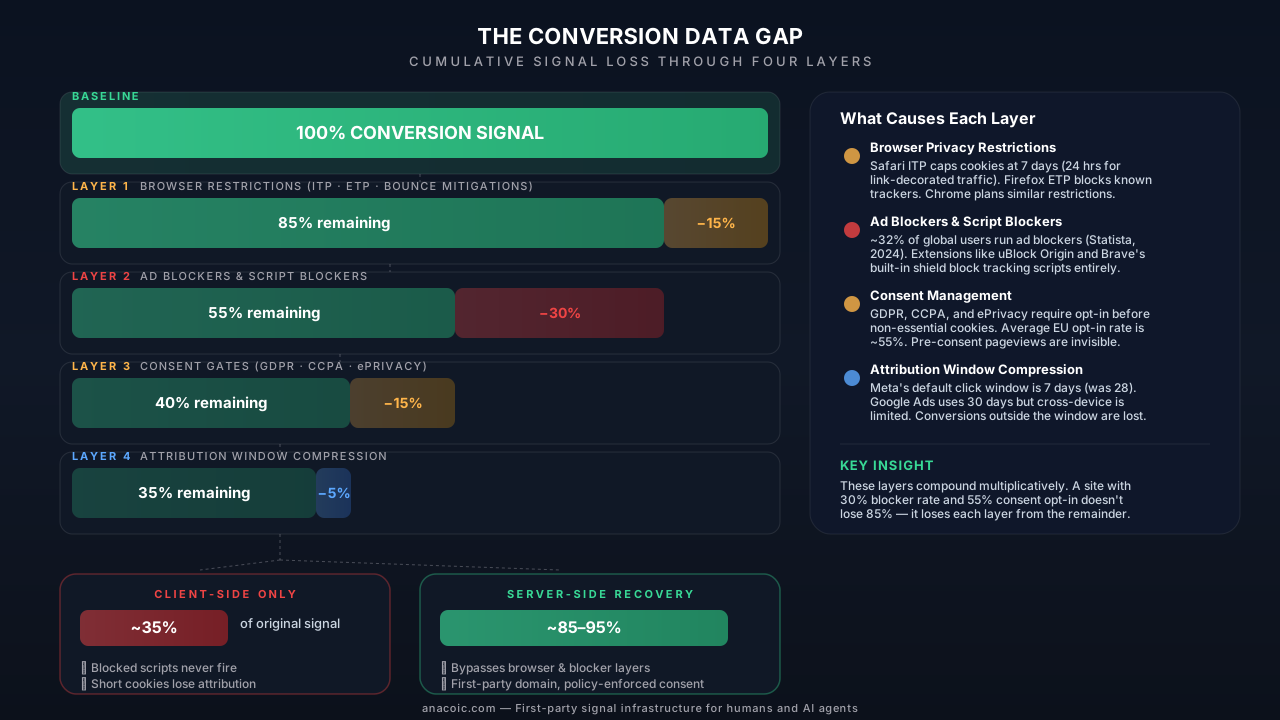
The conversion data gap is not a single problem. It is four compounding layers of signal loss that most client-side setups cannot address. A server-side path bypasses the browser-dependent layers entirely.
Layer 1: Browser Privacy Restrictions
Impact: 10–15% signal loss from baseline
Browser vendors are the first line of defense against cross-site tracking, and their restrictions hit client-side analytics directly.
Safari (Intelligent Tracking Prevention — ITP): Safari was the first major browser to aggressively restrict tracking. ITP’s current behavior:
- First-party cookies set via
document.cookie(JavaScript) expire after 7 days maximum - If the user arrived via a URL with known click-ID parameters (like
fbclid,gclid,ttclid), those cookies expire in 24 hours - This means a user who clicks a Meta ad on Safari, browses your site, and converts 3 days later cannot be attributed back to the click by a client-side pixel
Safari holds approximately 18–20% of global browser market share, but in certain verticals — particularly US-based DTC, luxury, and lifestyle brands — Safari share can exceed 35–40% due to high iPhone adoption.
Firefox (Enhanced Tracking Protection — ETP): Firefox blocks known tracking domains by default using a maintained blocklist. Any script loaded from a domain on that list is blocked or partitioned. Firefox holds roughly 3–4% of global share but can be higher in European and privacy-conscious markets.
Chrome (Tracking Protection / Privacy Sandbox): Chrome has moved away from its original plan to fully deprecate third-party cookies, but it has introduced cookie partitioning (CHIPS), reduced referrer granularity, and the Privacy Sandbox APIs (Topics, Attribution Reporting). These changes reduce the effectiveness of traditional client-side pixels even when cookies technically persist.
Bounce tracking mitigations: Both Safari and Firefox now detect and clear cookies from suspected bounce-tracking domains — sites that briefly redirect users to set or read cookies. This hits some intermediate tracking solutions that rely on redirect chains.
| Browser | Market Share (approx.) | Key Restriction | Cookie Lifetime Impact |
|---|---|---|---|
| Safari | 18–20% | ITP: JS cookies capped | 7 days (24 hrs with link decoration) |
| Firefox | 3–4% | ETP: known tracker blocking | Blocked entirely for listed domains |
| Chrome | 63–65% | Partitioned cookies, Privacy Sandbox | Reduced cross-site effectiveness |
| Brave | 1–2% | Aggressive blocking by default | Blocks most tracking scripts |
| Edge | 5–6% | Tracking Prevention (Balanced) | Blocks known third-party trackers |
Layer 2: Ad Blockers and Script Blockers
Impact: 25–35% of remaining signal lost
Ad blockers operate at a different level than browser privacy features. Where ITP restricts cookie behavior, ad blockers prevent tracking scripts from loading at all. No script means no pixel fires, no conversion event, no data.
According to Statista and PageFair research, approximately 32% of global internet users had an ad blocker installed as of 2024. That number is higher in certain segments:
- 18–34 age group: 40–45% ad blocker usage
- Tech-savvy audiences: 50%+ ad blocker usage
- Desktop users: higher adoption than mobile (browser extensions are easier to install)
- Germany, France, Nordics: above-average ad blocker rates (35–42%)
What ad blockers actually block:
Most ad blockers (uBlock Origin, AdBlock Plus, Brave Shields) use filter lists like EasyList and EasyPrivacy. These lists target:
- ✅ Meta Pixel (
connect.facebook.net/en_US/fbevents.js) - ✅ Google Ads conversion tracking (
googleadservices.com/pagead/conversion/) - ✅ TikTok Pixel (
analytics.tiktok.com) - ✅ Google Analytics (
google-analytics.com/analytics.js,googletagmanager.com/gtag/) - ✅ Most third-party analytics scripts loaded from known tracking domains
When an ad blocker prevents a script from loading, the conversion event never fires. The platform never sees the purchase. From Meta’s perspective, the ad click happened but no conversion followed — which degrades both reporting accuracy and algorithmic optimization.
This is not a marginal issue. If 30% of your audience runs ad blockers and your tracking is entirely client-side, you are feeding ad platform algorithms data from only 70% of your actual conversions. The algorithm optimizes on incomplete signal, which means it bids incorrectly, targets less precisely, and wastes budget.
Layer 3: Consent Requirements
Impact: 10–20% additional signal loss (varies by jurisdiction and implementation)
Privacy regulations — GDPR (EU), CCPA/CPRA (California), ePrivacy Directive (EU), LGPD (Brazil), PIPA (South Korea) — require informed consent before setting non-essential cookies or processing personal data for advertising.
In practice, this means:
- A Consent Management Platform (CMP) must display a banner before tracking scripts activate
- Users who dismiss the banner, close the tab, or click “Reject” generate zero tracking data for that session
- Users who ignore the banner (never interact) are typically treated as non-consented, which means their pageviews and conversions are invisible
Opt-in rates by region (approximate, based on industry benchmarks):
| Region | Average Opt-In Rate | Impact on Signal |
|---|---|---|
| EU (GDPR) | 50–60% | 40–50% of sessions untracked |
| UK (UK GDPR) | 55–65% | 35–45% of sessions untracked |
| California (CCPA) | 70–80% (opt-out model) | 20–30% of sessions untracked |
| Rest of US | 85–90% | 10–15% of sessions untracked |
| Brazil (LGPD) | 60–70% | 30–40% of sessions untracked |
The consent layer is particularly insidious because it creates a systematic bias in your data. Users who accept cookies tend to be less privacy-conscious, often older, and may have different purchasing behavior than those who reject. Your conversion data is not just incomplete — it is skewed.
For agencies managing clients with significant European traffic, consent can be the single largest source of signal loss. A brand with 40% EU traffic and a 55% opt-in rate is losing nearly 20% of total conversions to consent alone — before accounting for blockers or browser restrictions.
Layer 4: Attribution Window Compression
Impact: 5–15% of remaining attributed conversions hidden
Even when a conversion event fires and reaches the ad platform, it may not be attributed to the ad that caused it if the conversion happens outside the platform’s attribution window.
Current default attribution windows:
| Platform | Click Window | View Window | Previous Click Window |
|---|---|---|---|
| Meta Ads | 7 days | 1 day | 28 days (pre-2021) |
| Google Ads | 30 days | — | 30 days |
| TikTok Ads | 7 days | 1 day | 28 days (pre-2022) |
| Pinterest Ads | 30 days | 1 day | 30 days |
| Snapchat Ads | 28 days | 1 day | 28 days |
The compression from 28-day to 7-day click windows on Meta alone hid an estimated 10–15% of attributed conversions for many advertisers when the change rolled out. Products with longer consideration cycles — B2B SaaS, high-ticket ecommerce, financial services, travel — were hit hardest.
This layer is different from the first three because the conversion is captured — the pixel fires, the event reaches the platform. But the platform’s attribution model no longer connects it to the original ad interaction. From the advertiser’s reporting dashboard, that conversion simply does not exist as an ad-driven event.
Combined with Safari ITP’s 24-hour cookie expiration on decorated links, the effective attribution window for a Meta ad click from a Safari user is often less than one day, not seven.
The Compounding Effect
The four layers do not add up linearly. They compound multiplicatively because each layer removes signal from whatever remains after the previous layer.
Here is a realistic scenario for a DTC ecommerce brand with mixed US/EU traffic:
| Layer | Signal Lost at This Layer | Cumulative Signal Remaining |
|---|---|---|
| Baseline | — | 100% |
| Layer 1: Browser Restrictions | ~15% | 85% |
| Layer 2: Ad Blockers | ~30% of remaining | 59.5% |
| Layer 3: Consent Gates | ~15% of remaining | 50.6% |
| Layer 4: Attribution Compression | ~10% of remaining | 45.5% |
In this scenario, less than half of actual conversions are attributed to the campaigns that drove them. And this uses moderate assumptions — a site with heavy European traffic, younger demographics, or high-consideration products could see the gap widen to 60–65%.
What this means in practice:
- Your Meta Ads dashboard says you had 200 purchases this week. The real number is closer to 400.
- Your reported ROAS of 3.2x is actually 6.0–7.0x — you are likely underspending on your best campaigns
- The algorithm is optimizing on a biased, incomplete dataset, targeting the profile of users who accept cookies and do not run ad blockers — not necessarily your most valuable customers
- Your CPA looks high, so you cut budget on campaigns that are actually profitable
This is why the conversion data gap is not just a reporting problem. It is a budget allocation problem and an algorithmic optimization problem.
How to Measure Your Actual Data Gap
Before implementing fixes, you need to quantify your specific gap. Here are three concrete methods:
Compare pixel-reported vs. server-reported conversions
If you have any server-side event tracking (even partial), compare the conversion counts:
- Pull your ad platform’s reported conversions for a defined period (e.g., last 30 days)
- Pull your server-side conversion count from your backend, payment processor, or order management system for the same period
- Calculate the gap:
(Server Count - Platform Count) / Server Count × 100
A healthy gap for a well-instrumented site is 5–15%. If you are seeing 30%+, your client-side tracking has significant blind spots.
For Shopify stores, compare Shopify’s actual order count against Meta’s or Google’s reported conversions. The delta is your data gap.
Check blocked script rates in your analytics
Use a lightweight server-side check to measure how often your tracking scripts fail to load:
- Add a server-side endpoint that logs a “page served” event for every page render
- Compare that count against your client-side analytics “pageview” count (e.g., Google Analytics page views)
- The difference approximates your blocker + script failure rate
If your server logs show 100,000 page renders but GA reports 72,000 pageviews, roughly 28% of your tracking scripts are being blocked.
Audit consent opt-in rates
Your CMP dashboard (OneTrust, Cookiebot, Osano, or similar) should report:
- Banner display rate — percentage of sessions that see the banner
- Opt-in rate — percentage who accept analytics/marketing cookies
- Ignore rate — percentage who navigate without interacting with the banner
- Reject rate — percentage who explicitly decline
Multiply your reject + ignore rates by your EU/EEA traffic share to estimate consent-driven signal loss.
Why Client-Side Fixes Cannot Close the Gap
There is no client-side workaround for the fundamental problem: if the browser prevents a script from running, the conversion event never exists.
Common client-side “fixes” and why they fall short:
- ❌ Custom domains for GTM — Helps with some basic blocklist rules, but sophisticated blockers (uBlock Origin) also target script content signatures, not just domains
- ❌ Cookie extensions / prolongation scripts — ITP detects and restricts JavaScript-set cookies regardless of domain. The 7-day cap applies to all
document.cookieoperations - ❌ Fingerprinting or probabilistic matching — Violates privacy regulations in most jurisdictions. Platforms are actively reducing support for fingerprint-based signals
- ❌ Delayed pixel firing — Does not help if the pixel script itself was blocked from loading
- ❌ Consent workarounds — “Legitimate interest” claims for marketing pixels are not defensible under GDPR enforcement guidance. Regulators have issued fines for this approach
The core issue is architectural. Client-side tracking depends on the browser cooperating — loading your scripts, allowing cookies, and executing pixel code. Three of the four signal-loss layers directly attack that dependency.
The Server-Side Recovery Path
Server-side tracking removes the browser from the critical path for conversion events. Instead of relying on a JavaScript pixel to fire in the user’s browser, the conversion event is generated by your server and sent directly to the ad platform’s server-side API.
What server-side tracking recovers (and what it does not)
| Signal Loss Layer | Client-Side Only | Server-Side Recovery |
|---|---|---|
| Browser Restrictions (ITP/ETP) | ❌ Cannot prevent cookie capping | ✅ Server-set first-party cookies bypass ITP JavaScript limits |
| Ad Blockers | ❌ Blocked scripts never fire | ✅ Server sends events directly — no browser script required |
| Consent Gates | ❌ Pre-consent events invisible | ⚠️ Still requires consent — but can apply policy server-side and send consented events reliably |
| Attribution Compression | ❌ No control over platform windows | ⚠️ Longer-lived first-party cookies improve matching, but platform windows remain |
Server-side tracking fully recovers Layer 1 and Layer 2 losses. It improves Layer 3 handling by enforcing consent in the pipeline rather than depending on the CMP’s client-side script execution. It partially mitigates Layer 4 through better matching — server-set cookies last longer, which means the platform can match conversions that happen days after the initial click.
First-party domains and script delivery
A critical component of server-side recovery is serving your tracking infrastructure from your own first-party domain. When a tracking script is served from track.yourbrand.com instead of connect.facebook.net, it bypasses the majority of ad blocker filter lists because the domain is not on any blocklist.
Similarly, cookies set by a server response from your first-party domain are treated as first-party cookies by every browser — they are not subject to ITP’s JavaScript cookie caps or ETP’s third-party blocking. A server-set first-party cookie can persist for up to 400 days (the browser’s maximum for first-party cookies).
This is the technical foundation of what we call first-party signal infrastructure — a controlled path where signals flow through your domain, under your policy, to the destinations that need them.
Policy-enforced consent in the pipeline
Server-side tracking does not eliminate the need for consent. It changes where and how consent is enforced.
In a client-side-only setup, consent enforcement happens in the browser: the CMP gates whether scripts load. This is fragile — if the CMP script itself is blocked, consent state is unknown and tracking fails silently.
In a server-side architecture, the consent signal is captured once and passed to the server pipeline. The server enforces policy consistently:
- ✅ Consented events are enriched and forwarded to all configured destinations
- ✅ Non-consented events are handled according to your data policy (aggregated, anonymized, or dropped)
- ✅ Consent state is logged for audit trails
- ✅ Policy changes propagate instantly — no need to redeploy client-side code
This approach is more robust and more auditable than client-side enforcement. It does not increase the opt-in rate, but it ensures that every consented conversion actually reaches the ad platforms.
What a First-Party Signal Architecture Changes
Moving from client-side pixels to a first-party signal architecture is not just a tracking upgrade. It changes how your business relates to conversion data.
Before (client-side only):
- ❌ Ad platforms see 35–50% of actual conversions
- ❌ Algorithms optimize on biased, incomplete signal
- ❌ Reported ROAS understates actual performance by 40–60%
- ❌ You cannot distinguish “tracking failure” from “campaign failure”
- ❌ Each browser update or new regulation creates a new fire drill
After (first-party signal infrastructure):
- ✅ Ad platforms see 85–95% of actual conversions
- ✅ Algorithms optimize on representative data — bid accuracy improves
- ✅ Reported ROAS reflects actual performance within 5–15% margin
- ✅ You have a clear audit trail: which events were sent, with what consent, to which destination
- ✅ Browser updates do not break your measurement — the server path is independent
For agencies, this shift also changes client conversations. Instead of explaining why Meta’s reported purchases do not match Shopify’s order count, you can show a dashboard where the numbers align — and the discrepancy is explained by consent policy, not infrastructure failure.
For a detailed comparison of how this compares to other approaches, see Anacoic vs Stape.
Practical Next Steps for Agencies and Growth Teams
If you manage paid media for clients or run growth for an ecommerce brand, here is a prioritized action plan:
1. Quantify the gap (Week 1)
- Run the three measurement checks described above (pixel vs. server counts, blocked script rates, consent opt-in rates)
- Document the gap as a percentage for each client or property
- Segment by geography — EU properties will have a larger consent-driven gap
2. Evaluate your current stack (Week 2)
- Identify which ad platforms you send conversion data to (Meta CAPI, TikTok Events API, Google enhanced conversions, etc.)
- Determine if you have any server-side event pipeline in place today
- Assess your current CMP configuration and opt-in rates
3. Implement server-side tracking (Weeks 3–4)
- Set up a server-side tracking path for your highest-spend ad platforms first (usually Meta and Google)
- Configure a first-party domain for script and event delivery
- Integrate your order/conversion backend as the source of truth for purchase events
4. Validate and compare (Ongoing)
- Run parallel tracking (client-side and server-side) for 2–4 weeks
- Compare conversion counts from both paths
- Monitor match rates — the percentage of server events that the ad platform successfully matches to ad interactions
- Adjust enrichment parameters (email hashing, phone, IP forwarding) to improve match quality
5. Brief your team and clients
- Share the before/after data gap numbers
- Reframe ROAS reporting — historical client-side-only ROAS was understated
- Adjust budget recommendations based on actual (server-reported) performance data
For teams managing Shopify stores, the integration path is well-defined and can typically be completed in under a week. For custom stacks, plan for 2–3 weeks of engineering effort.
If you are evaluating cookieless tracking approaches, server-side infrastructure is the foundation — not a separate initiative.
FAQ
What exactly is the “conversion data gap”?
The conversion data gap is the difference between the conversions that actually occur on your site and the conversions reported by your ad platforms. It is caused by four compounding layers: browser privacy restrictions, ad blockers, consent requirements, and attribution window compression. For most businesses, this gap is 35–65% of total conversions.
How much signal do ad blockers actually block?
Approximately 32% of global internet users run ad blockers (per Statista/PageFair research, 2024). Among younger and more technical audiences, adoption exceeds 40%. Ad blockers prevent tracking scripts from loading entirely — the conversion event never fires, so the ad platform has zero visibility into that user’s actions.
Does server-side tracking eliminate the need for consent?
No. Server-side tracking does not bypass consent requirements. GDPR, CCPA, and similar regulations still apply. What changes is where consent is enforced: instead of relying on a client-side CMP to gate script loading, the server pipeline enforces consent policy consistently, logs the decision, and ensures that consented events are reliably delivered to ad platforms.
Can I fix the data gap without moving to server-side?
Not meaningfully. Client-side workarounds (custom GTM domains, cookie extension scripts, delayed pixel firing) address narrow slices of the problem but cannot recover signal from blocked scripts or capped cookies. The core issue is architectural — if the browser will not run your tracking code, no amount of client-side optimization will help.
How long does it take to implement server-side tracking?
For Shopify stores, a well-documented integration can be completed in 3–5 days. For custom ecommerce platforms or complex multi-domain setups, plan for 2–4 weeks. The key steps are: setting up a first-party domain, configuring the server-side event pipeline, integrating your conversion data source, and validating match rates.
Will closing the data gap change my ROAS numbers?
Yes — your reported ROAS will increase, often significantly. This is not because performance improved overnight. It is because you were previously underreporting conversions. If your actual data gap was 50%, your true ROAS was roughly double what the platform reported. This has direct implications for budget allocation — campaigns you considered marginal may actually be highly profitable.
What should I read next?
Start with these guides based on where you are:
- New to server-side tracking: Server-Side Tracking: The Complete Guide
- Dealing with iOS signal loss: iOS 14.5+ Tracking Fix
- Evaluating infrastructure options: Anacoic vs Stape Comparison
- Want the conceptual foundation: What Is First-Party Signal Infrastructure?
- Exploring cookieless approaches: Cookieless Tracking: The Complete Guide
Ready to close your conversion data gap?
- Start free trial — 7 days, 10K signals
- Book a demo — see your data gap quantified
- Read the docs — implementation guide for agencies